Written by Jackson Pearce Student engineer and creator of TalonTodo
I used to check my email constantly. Every notification, every buzz, I'd drop what I was doing to respond. I thought I was being responsive and efficient. Turns out, I was just being scattered.
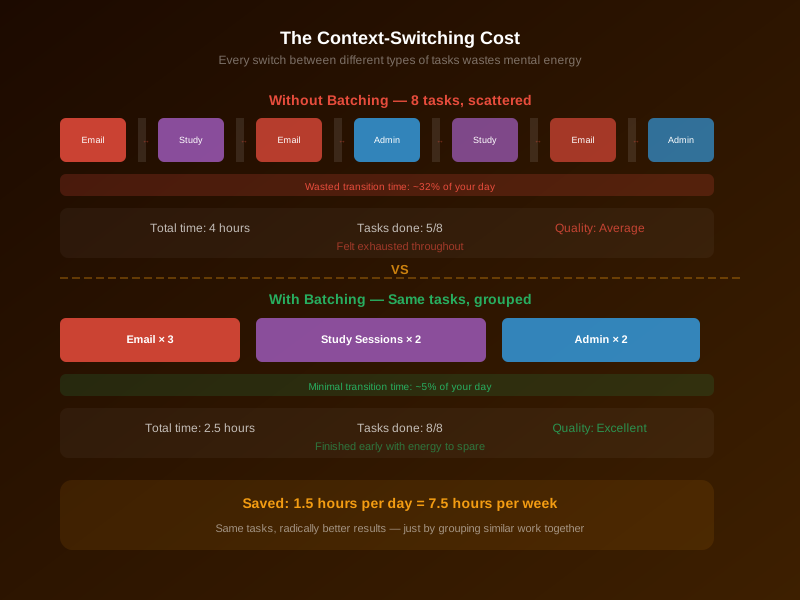
Then I read about context switching—how your brain needs time to refocus every time you switch tasks. Research shows it can take up to 23 minutes to fully refocus after switching. I was switching between email, coding, studying, and messages all day. No wonder I felt exhausted but accomplished nothing meaningful.
That's when I discovered batching. It changed how I work, and it's one of the core principles I built into TalonTodo's smart scheduler.
What Batching Actually Is
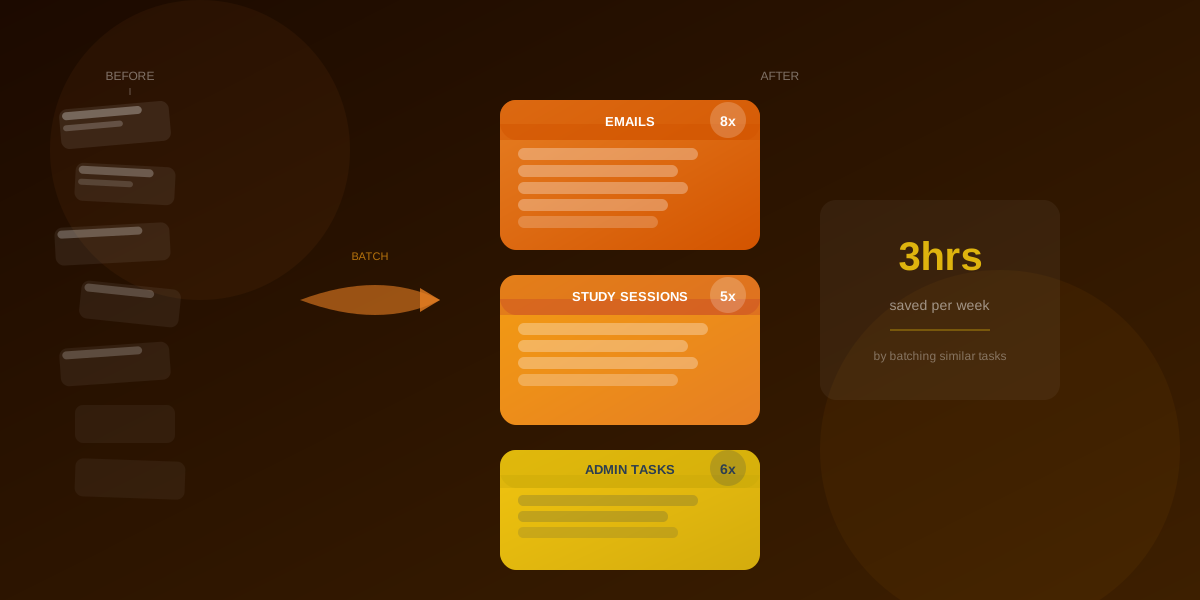
Batching means grouping similar tasks together and doing them all at once. Instead of answering emails throughout the day, you check email three times. Instead of making calls randomly, you have a "phone call block." Instead of jumping between different assignments, you focus on one type of work at a time.
Simple concept, huge impact.
The key insight: your brain works better when it stays in one "mode." When you're in "email mode," you process emails faster. When you're in "coding mode," you write better code. When you're in "writing mode," you write better papers.
Every time you switch modes, your brain has to reset. That reset costs time and energy.
The Science Behind Context Switching
I didn't believe the research at first. Twenty-three minutes to refocus? That seemed extreme. So I tracked my own work for a week.
Here's what I found: When I checked email while coding, it took me about 15-20 minutes to get back into the coding flow. I'd forget where I was, what I was working on, what approach I was taking. I'd have to re-read code, re-understand the problem, re-enter the mental state.
When I batched my email into three 20-minute blocks, I processed the same number of emails in less total time. I was faster because I stayed in "email mode." And I had large blocks of uninterrupted time for actual work.
The math is simple: If you check email 20 times a day, taking 2 minutes each time, that's 40 minutes. But with context switching, it's probably closer to an hour or more. If you batch email into 3 sessions of 15 minutes each, you spend 45 minutes total. But you're actually faster when batching, so you might finish in 30 minutes.
You've saved time and mental energy.
What to Batch
Not everything benefits from batching, but many things do:
Communication Tasks
Emails, messages, Slack, texts. Pick 2-3 times a day to handle everything. I check email at 9am, 1pm, and 5pm. Outside those times, email is closed.
Social media and notifications. Batch these too. Check them at specific times, not constantly.
Phone calls and meetings. If possible, group calls together. Have a "calls block" in your schedule.
I used to respond to every message immediately. Now I batch all communication, and I'm more responsive overall because I'm not constantly interrupting my deep work.
Administrative Tasks
Filing, organizing, calendar updates, expense reports. One block per week. I do all my admin work on Friday afternoons.
Planning and review. Batch your weekly planning, goal setting, and reviews into dedicated blocks.
Errands and logistics. Group them geographically or by type. One trip instead of many.
Research and Reading
Articles, research, learning. One longer block instead of constant interruptions. I have a "learning block" on Sunday mornings where I read articles, watch tutorials, and explore new topics.
Course readings. Instead of reading a little bit for each class every day, batch readings by class. Read all your history readings in one block, all your science readings in another.
This was a game-changer for me. I used to jump between subjects constantly. Now I batch by subject, and I retain information better because I'm not constantly switching contexts.
Creative Work
Writing, design, problem-solving. Protected blocks without interruptions. This is your deep work time.
Coding and development. Large blocks for focused programming. No email, no messages, no distractions.
Project work. Dedicated blocks for working on specific projects.
I protect my creative work blocks fiercely. They're non-negotiable. That's when I do my best work.
Study Tasks
Review sessions. Batch all your review work together. Review all your notes, all your flashcards, all your practice problems in dedicated blocks.
Assignment work. Instead of working on five different assignments in one day, batch by assignment. Finish one completely, then move to the next.
Practice problems. Do all your math problems in one block, all your coding exercises in another.
How to Start Batching
Don't try to batch everything at once. That's overwhelming and you'll give up. Start with one area.
Step 1: Identify Your Switching Patterns
Look at your typical week. What are you doing repeatedly throughout the day? Those are your batching candidates.
For me, it was:
- Email (checking constantly)
- Messages (responding immediately)
- Reading (jumping between articles and assignments)
- Administrative tasks (doing them randomly)
Step 2: Pick One Area
Choose one type of task and try batching it this week. See how it feels. Then add another.
I started with email. I committed to checking it only three times per day. The first week was hard—I felt like I was missing things. But I wasn't. I was just responding in batches instead of constantly.
Step 3: Schedule Your Batches
Put your batches on your calendar. "Email batch - 9am." "Reading batch - 2pm." "Admin batch - Friday 3pm."
When it's on your calendar, you're more likely to stick to it. I use TalonTodo's calendar integration to block out my batches, so I can see them alongside my other commitments.
Step 4: Protect Your Batched Time
This only works if you actually batch. If you're checking email during your writing block, you're not batching—you're just being inconsistent.
Turn off notifications during batched time. I put my phone in another room.
Close unnecessary tabs. If you're in a writing batch, close everything except your writing tool.
Use website blockers. Block distracting sites during your batches.
Actually commit to the batch. No "just one quick check." That's how batching breaks down.
The Compound Effect
One batched task might save you 15 minutes. But batching everything you do can save you hours per week. Hours you can use for important work, rest, or life.
Let me break down my typical day before and after batching:
Before batching:
- Email: 20 checks × 3 minutes = 60 minutes (plus context switching)
- Messages: 15 responses × 2 minutes = 30 minutes (plus context switching)
- Reading: Scattered throughout day = 90 minutes (inefficient)
- Admin: Random times = 30 minutes (inefficient)
- Total: ~3.5 hours, but felt like 5 hours of work
After batching:
- Email: 3 batches × 15 minutes = 45 minutes
- Messages: 2 batches × 10 minutes = 20 minutes
- Reading: 1 focused block = 60 minutes (more efficient)
- Admin: 1 weekly block = 30 minutes
- Total: ~2.5 hours, feels like 2.5 hours
I saved an hour per day. That's 5 hours per week. Over a semester, that's 75 hours. That's almost two full weeks of work time.
Common Batching Mistakes
I made these mistakes when I started. Learn from them:
Mistake 1: Batching Too Aggressively
I tried to batch everything into huge blocks. Four-hour email batches. Six-hour coding blocks. I burned out.
Solution: Start with reasonable batch sizes. 30-60 minutes for most tasks. 2-3 hours for deep work. Adjust based on what works for you.
Mistake 2: Not Actually Batching
I'd schedule a batch, then check email "just once" during it. That defeats the purpose.
Solution: Be strict during batch time. No exceptions. If you need to check something, wait until the next batch.
Mistake 3: Ignoring Urgent Items
I worried that batching would make me miss urgent things. But urgent things are rare. Most things can wait a few hours.
Solution: Have a system for true emergencies. For everything else, it can wait until your next batch.
Mistake 4: Not Adjusting
I set my batches and never changed them. But my schedule changes. My needs change.
Solution: Review your batches monthly. Adjust timing and frequency based on what's working.
Batching and Energy Levels
Match your batches to your energy levels:
High energy: Batch your most demanding work. Creative tasks, difficult problems, complex projects.
Medium energy: Batch routine tasks. Email, admin, review work.
Low energy: Batch simple tasks. Filing, organizing, light reading.
I do my creative batches in the morning when I'm fresh. I do my email batches in the afternoon when my energy is lower. This maximizes my productivity.
How TalonTodo Supports Batching
I built batching principles into TalonTodo because I needed help sticking to it. Here's how it helps:
Why I built it: I kept breaking my own batching rules. I'd schedule a batch, then get distracted and check email anyway. I needed a tool that would help me stay committed.
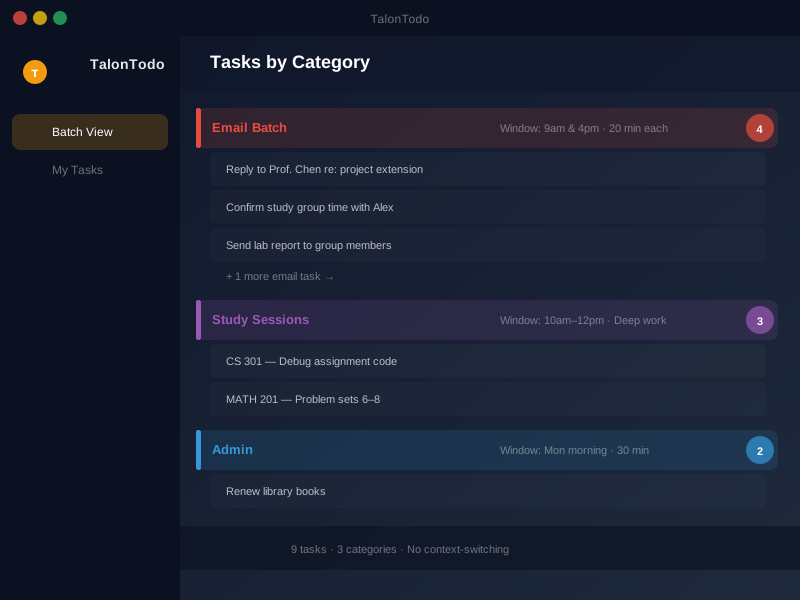
How it helps: TalonTodo's smart scheduler suggests when to batch similar tasks. It groups tasks by type and suggests working on them together. The calendar integration shows your batches alongside other commitments, so you can see the full picture.
Feature example: The task grouping feature automatically suggests batching. If you have five emails to respond to, it suggests doing them all in one block. If you have multiple readings for the same class, it groups them together. This makes batching easier and more natural.
The app also helps you protect your batches. When you're in a focused work block, you can set "do not disturb" mode, which hides non-urgent notifications.
Real-World Examples
Here's how I batch different types of work:
Academic Work
Monday mornings: All my math homework in one 2-hour block. I'm fresh, focused, and can work through problems efficiently.
Tuesday afternoons: All my reading for the week. I read for 3 hours straight, taking notes as I go. Much more efficient than reading a little bit each day.
Wednesday mornings: Writing assignments. All my papers, essays, and written work in one focused block.
Thursday afternoons: Review and study. Flashcards, practice problems, concept review—all together.
Friday afternoons: Admin and planning. Organize notes, update calendar, plan next week.
Personal Projects
Saturday mornings: Coding projects. Large 4-hour blocks for building features, debugging, and development.
Sunday mornings: Learning and research. Reading articles, watching tutorials, exploring new technologies.
Communication
9am, 1pm, 5pm: Email batches. I process everything in 15-20 minutes, then close email until the next batch.
Evening: Messages and social media. One 30-minute block to catch up on everything.
The Results
After implementing batching consistently, I noticed:
- More focused work: Large blocks of uninterrupted time for important tasks
- Less mental fatigue: Not constantly switching contexts
- Better quality work: Deeper focus leads to better results
- More free time: Efficiency created space in my schedule
- Less stress: Clear structure reduced decision fatigue
- Better retention: Batching study work improved my learning
I also noticed I felt more accomplished. Instead of feeling busy all day but getting nothing done, I had clear blocks where I made real progress.
Getting Started
Try it this week. Pick one type of task you do repeatedly and batch it:
- Identify the task (email, reading, admin, etc.)
- Decide on batch frequency (2-3 times per day? Once per week?)
- Schedule your batches on your calendar
- Protect the batches (no exceptions during batch time)
- Track the results (how much time did you save?)
Start with one area. Master it. Then add another. Batching is a skill that improves with practice.
The best productivity hack isn't finding more time—it's using the time you have more effectively. Batching helps you do that by reducing context switching and increasing focus.
Try it. Pick one type of task this week and batch it. See what happens. I bet you'll find you have more time and get more done.
About the author Jackson Pearce is a student engineer and the creator of TalonTodo, a productivity app designed to help students manage projects, deadlines, and daily tasks more effectively.