Written by Jackson Pearce Student engineer and creator of TalonTodo
I used to spend more time entering tasks into my todo app than actually doing them. Open app, tap create, fill in title, set date, choose category, add notes, save. Six steps just to add "Study for chemistry exam Friday." By the time I'd entered three tasks, I'd forgotten what I was supposed to be doing.
Then I discovered natural language processing. Instead of filling out forms, I could just type "Study for chemistry exam Friday" and the app would understand everything. That moment changed how I thought about task management, and it became the core feature of TalonTodo.
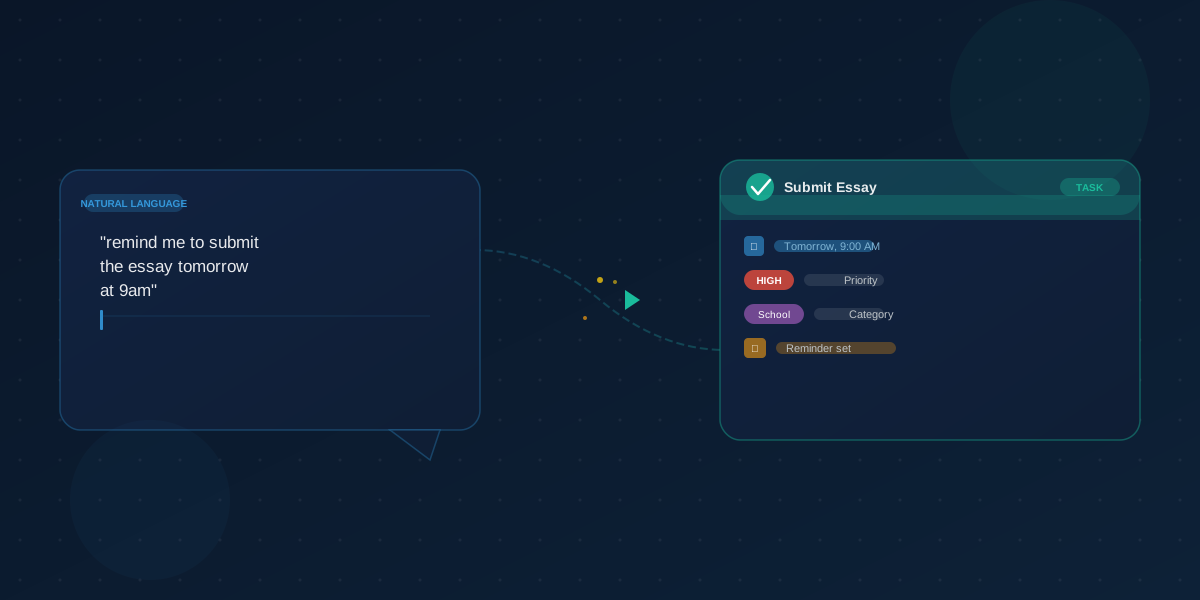
What Natural Language Task Management Actually Is
Natural language processing (NLP) enables apps to understand human language and convert it into structured tasks. Instead of filling out multiple form fields, you can simply type "Study for chemistry exam next Friday" and the system understands the task, the deadline, and potentially the subject category.
This makes task entry faster, more intuitive, and less interrupting to your workflow. You think in natural language, so why shouldn't your task app understand it?
I built TalonTodo's NLP parser because I was frustrated with form-based task entry. I wanted to capture tasks as quickly as I thought of them, without breaking my flow to navigate menus and fill fields.
Why Natural Language Works for Students
Speed and Convenience
Traditional task entry requires multiple steps: open app, tap create, fill title, set date, choose category, save. Natural language condenses this to one step: type and go.
I timed myself: Form-based entry took 45 seconds per task. Natural language takes 5 seconds. That's 9x faster. Over a semester, that saves hours.
Cognitive Load Reduction
When ideas come to you (in class, walking between buildings, late at night), you can capture them quickly without breaking your train of thought to navigate menus and fill forms.
I used to lose tasks because entering them was too cumbersome. Now I capture everything immediately, and nothing gets forgotten.
Flexibility
Natural language is flexible. You can phrase tasks however feels natural:
- "Read chapter 5 before tomorrow's class"
- "Review calculus homework due Thursday"
- "Finish research paper draft by next Monday afternoon"
There's no "right way" to phrase it. Just type how you think about it.
Less Context Switching
Since entry is so quick, you stay in your current context longer. This reduces mental fatigue and helps you maintain focus on what you're doing.
I can capture a task in the middle of studying without losing my flow. That's huge for maintaining focus.
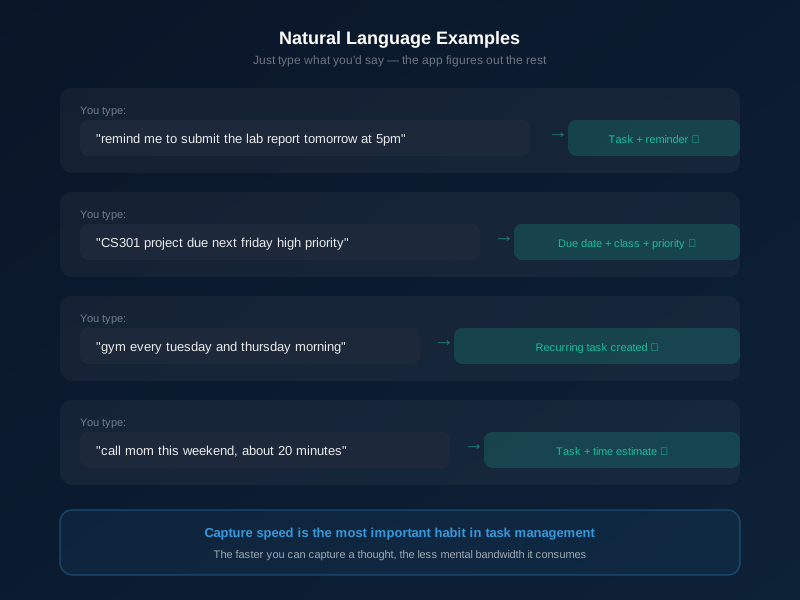
How to Use Natural Language Effectively
Include Key Information
Good natural language inputs include the action (what needs to be done), the deadline (when it's due), and context (subject, class, or category when relevant).
Examples:
- "Write essay on climate change for English class due next Tuesday"
- "Review biology notes for tomorrow's quiz"
- "Submit physics lab report by Friday 5pm"
The more information you include, the better the parser can understand and organize your task.
Be Specific
While natural language is flexible, specificity helps. "Review chapters 3-5 for midterm next week" is better than "Study stuff." Specificity helps you remember what the task actually entails when you see it later.
I've learned to be specific in my task entries. Vague tasks lead to confusion later when I can't remember what I meant.
Use Natural Date References
Natural language understands various date formats:
- Relative: "tomorrow," "next week," "in 3 days"
- Day names: "Monday," "this Friday," "next Tuesday"
- Dates: "January 25," "12/15/2025"
- Times: "5pm," "morning," "before class"
I use whatever feels natural in the moment. The parser handles it.
Combine Multiple Elements
You can include multiple pieces of information in one entry:
- "Prepare presentation on Renaissance art for art history class, present next Thursday at 2pm"
- "Finish calculus problem set due Friday, then review for quiz Monday"
The parser extracts everything and structures it properly.
Common Natural Language Patterns
Task Creation with Deadline
"Task name due [date/time]"
- "Essay draft due next Monday"
- "Lab report due Friday 3pm"
Tasks with Priority
"Task name [priority indicator]"
- "Finish urgent project ASAP"
- "Review notes - high priority"
Recurring Tasks
"Task name every [frequency]"
- "Review notes every day"
- "Submit weekly journal every Monday"
Task with Category/Tag
"Task name for [category]"
- "Read chapter 5 for biology"
- "Complete assignment for math class"
I use these patterns consistently, which helps the parser understand my preferences over time.
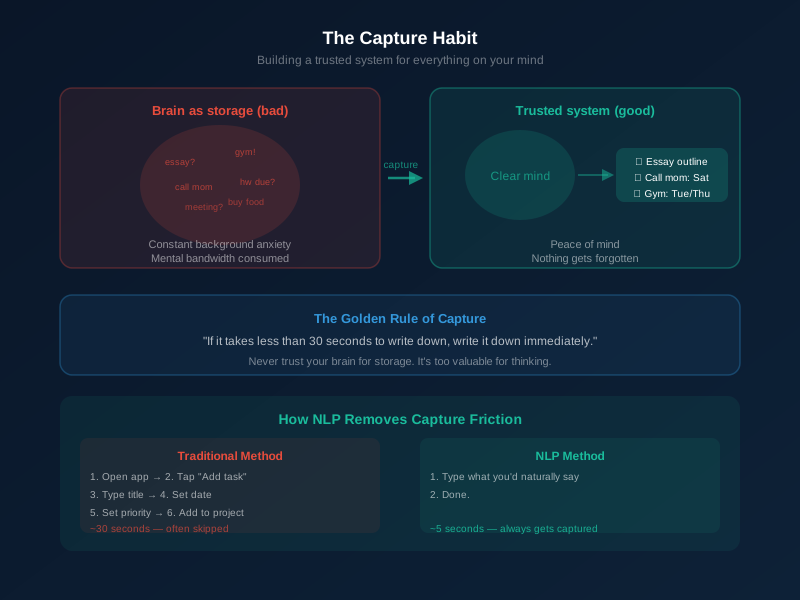
Best Practices for Students
Capture Ideas Immediately
When a task comes to mind, enter it immediately using natural language. Don't wait—you'll forget or lose context.
Good times to capture:
- During class when assignments are mentioned
- After meeting with a professor or advisor
- When reviewing syllabi
- When planning your week
I capture tasks as soon as I think of them. If I'm in class and the professor mentions an assignment, I type it into TalonTodo immediately. Takes 5 seconds, and it's captured forever.
Review and Refine Regularly
While natural language makes entry easy, review your tasks regularly. Confirm dates were parsed correctly, add details if tasks are vague, update if deadlines change, and complete or archive finished tasks.
I do a quick review every evening. I check that dates were parsed correctly and add any missing details. Takes 2 minutes, but ensures everything is accurate.
Use Consistent Patterns
Developing consistent phrasing helps you remember tasks more easily, search tasks more effectively, develop a personal system, and train the NLP to understand your preferences.
I've developed my own patterns over time. The parser has learned my preferences, which makes parsing even more accurate.
Combine with Organization
Natural language entry doesn't replace organization. Use categories or tags when helpful, set priorities appropriately, break down large tasks, and review and adjust regularly.
Natural language makes entry easy, but good organization makes tasks manageable. I use both together.
Examples for Student Life
Class Assignments
- "Read chapters 7-9 for history class, discuss Wednesday"
- "Complete chemistry lab report due next Friday"
- "Prepare 5-minute presentation on marketing trends for business class, present next Tuesday"
Exam Preparation
- "Review all biology chapters for final exam on December 15"
- "Study calculus formulas for quiz next Monday"
- "Create flashcards for Spanish vocabulary test next week"
Long-Term Projects
- "Research paper on climate change due in 3 weeks, start research this week"
- "Group project presentation due next month, schedule team meeting this week"
- "Final project proposal due by end of semester, outline due next Friday"
Administrative Tasks
- "Register for next semester's classes by November 1st"
- "Submit scholarship application before December 15"
- "Meet with advisor to discuss course schedule next week"
I use natural language for everything—assignments, exams, projects, admin tasks. It all works the same way.
Advantages Over Traditional Entry
Time savings: Natural language entry is typically 3-5x faster than form-based entry. I've saved hours over the semester.
Reduced errors: Less manual data entry means fewer mistakes. The parser handles formatting consistently.
Better capture: More likely to capture tasks when they come to mind. Lower friction means more tasks captured.
Less friction: Easier to maintain a comprehensive task list. No barriers to entry.
More natural: Matches how we think about tasks. You think in sentences, so you should enter tasks in sentences.
Tips for Maximum Effectiveness
Learn Your System's Patterns
Different natural language processors understand different patterns. Spend time learning what your system does best: how it handles relative dates, what time phrases it understands, how it categorizes tasks, what priority keywords work.
I spent a week learning TalonTodo's parser. Now I know exactly how to phrase things for best results.
Start Simple, Add Details Later
Don't feel you need to include everything in the initial entry. Capture the basics quickly, then add details during review:
- Initial: "Chemistry homework due Friday"
- Refined: "Complete problem set 5.1-5.3 for chemistry, show work, due Friday 5pm"
I capture quickly, then refine during my evening review.
Use Voice Input When Possible
Voice-to-text natural language entry is even faster. Speak tasks while walking between classes, capture ideas without looking at your device, maintain natural conversation flow.
I use voice input when I'm walking or can't type. It's just as effective.
Regular Review Still Matters
Natural language doesn't replace task management—it enhances it. Review tasks daily, adjust priorities, update deadlines, break down complex tasks.
Natural language makes entry easy, but good task management still requires regular review and organization.
How TalonTodo's Natural Language Parser Works
I built TalonTodo's NLP parser specifically to solve the task entry problem. Here's how it helps:
Why I built it: I was frustrated with form-based task entry. I wanted to capture tasks as quickly as I thought of them, without breaking my flow. Natural language was the solution.
How it helps: TalonTodo's NLP parser understands dates, times, priorities, classes, and task types. You type naturally, and it extracts everything. No forms, no menus, no friction. Just type and go.
Feature example: The parser recognizes patterns like "Study for bio exam tom urgent" and extracts: task="Study for exam", class="Biology", due="Tomorrow", priority="Urgent". It handles relative dates ("tomorrow", "next week"), named times ("morning", "afternoon"), priority keywords ("urgent", "important"), and class references ("bio", "calc", "p3").
The parser learns your patterns over time. If you always say "bio" for biology, it learns that. If you use specific date formats, it adapts. The more you use it, the better it gets.
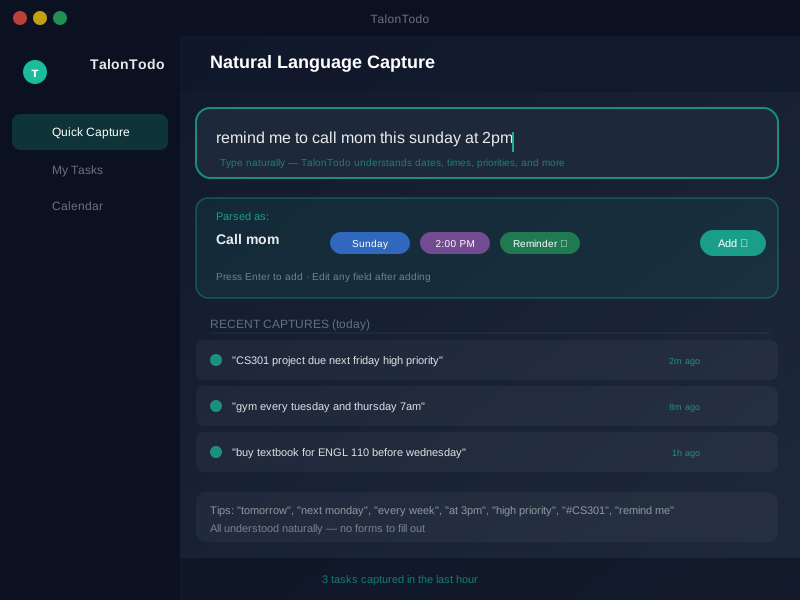
The Future of Task Management
Natural language processing continues to improve, making task entry increasingly intuitive. Systems are getting better at understanding context, suggesting categories, predicting deadlines, breaking down complex tasks, and integrating with calendars and other tools.
I'm constantly improving TalonTodo's parser based on how students actually use it. The goal is to make task entry as natural as thinking about tasks.
Getting Started
Ready to streamline your task management? Start using natural language input:
- Choose a tool that supports natural language processing
- Practice entering tasks using natural phrasing
- Review how dates are parsed and adjust
- Develop patterns that work for your workflow
- Capture immediately when tasks come to mind
Start with simple tasks. As you get comfortable, add more complexity. The parser will learn your patterns and get better over time.
Natural language task management transformed how I organize my academic life. What used to be a chore is now effortless. I capture tasks instantly, and nothing gets forgotten. That's the power of natural language.
The sentence for a homework item
The same idea, aimed at a class assignment: Add Homework in Plain English. A line like "essay Friday at 5" is enough to land the class, the day, and the time.
About the author Jackson Pearce is a student engineer and the creator of TalonTodo, a productivity app designed to help students manage projects, deadlines, and daily tasks more effectively.